

Signs Your Business Needs a Technical SEO Audit
Your business needs a technical SEO audit when organic traffic falls, commercially important pages disappear from Google, rankings decline across multiple pages simultaneously, or technical infrastructure actively prevents search engines from crawling, indexing, and understanding your website. For an SME, these problems reduce enquiries and revenue without triggering an error message or dashboard alert — just a slow, compounding bleed in organic visibility that a structured audit identifies and prioritises before it compounds further.
When I work through a technical audit, the single most damaging pattern I encounter is a site owner who has watched declining traffic for weeks without checking Google Search Console’s coverage report. The problem is almost always already documented there.
What a Technical SEO Audit Examines
A technical SEO audit examines whether search engines can discover, crawl, render, index, and understand a website correctly, connecting each finding to a measurable business consequence — not just a volume of warnings.
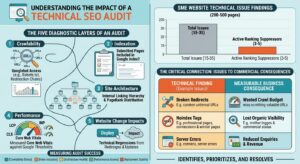
A properly structured audit maps five diagnostic layers:
- Crawlability — Googlebot’s ability to access every target URL without being blocked by
robots.txt, redirect errors, or server response failures - Indexation — whether pages submitted for indexing are actually included in Google’s index and surfaced in search results
- Site architecture — internal linking structure, URL hierarchy, and the distribution of PageRank across the site
- Performance — Core Web Vitals scores (LCP, INP, CLS) measured against Google’s documented threshold values
- Website change impacts — technical regressions introduced by redesigns, CMS updates, or developer deployments
We consistently find that SMEs with 200–500-page websites carry between 15 and 35 distinct technical issues by the time they commission an audit. Most are fixable. A minority — typically 3 to 5 issues — are the ones actively suppressing rankings.
What a Technical SEO Audit Covers
| Audit Category | What It Checks | Business Impact |
|---|---|---|
| Crawlability & Indexability | robots.txt directives, XML sitemaps | Pages blocked from Google lose all organic visibility |
| Redirect & Link Health | Broken links, redirect chains, HTTP errors | Crawl budget wasted; PageRank diluted |
| Canonical Tags & Duplicate URLs | Canonical directives, parameter handling | Incorrect canonicalisation splits ranking signals |
| JavaScript Rendering | Page rendering against Googlebot’s view | Unrendered content is invisible to search engines |
| Core Web Vitals | LCP, INP, CLS scores | Poor scores suppress rankings in page experience signals |
| Internal Linking & Architecture | Link depth, orphaned pages, site structure | Deep or disconnected pages receive reduced crawl frequency |
| Structured Data | Schema markup implementation | Missing structured data reduces eligibility for rich results |
| Mobile Usability | Responsive rendering, touch targets | Mobile usability failures trigger ranking demotion |
| Migration & URL Changes | Redirect coverage, lost canonicals post-migration | Site migrations are the leading cause of sudden traffic loss |
The output of a credible audit is a prioritised action plan. Low-priority cosmetic issues appear separately from high-priority crawl or indexing failures. An SME owner should be able to read the top five recommendations and understand why each one matters commercially.
Fact: Google confirmed that Core Web Vitals became a ranking signal in 2021, with Interaction to Next Paint (INP) replacing First Input Delay (FID) as a Core Web Vital metric in March 2024. Sites scoring “Poor” on INP now face a direct ranking disadvantage.
Sign 1: Has Your Organic Traffic Suddenly Dropped?
A significant, unexplained decline in organic traffic is the most common trigger for a technical SEO audit, particularly when the decline targets commercially important pages rather than informational blog posts.
Traffic losses rooted in technical causes typically appear abruptly — often within 24–72 hours of a deployment, migration, or configuration change. Organic traffic losses driven by algorithm updates or competitive shifts tend to be gradual and broader across the industry. I have seen SME websites lose 40–60% of organic sessions within two weeks of a migration, with the root cause being a single misconfigured redirect rule that blocked Googlebot from crawling the new URL structure. That client had already briefed a content agency before the technical problem was identified — an investment that produced zero return until the crawl issue was resolved.
Technical Causes That Drive Organic Traffic Loss
Search engines encounter these technical barriers most frequently:
- Accidental
noindexdirectives — a staging environment configuration deployed to production - Incorrect canonical tags — pages pointing to the wrong canonical, collapsing multiple URLs into a single non-ranking version
- Crawling restrictions — an updated robots.txt file blocking Googlebot from key directories
- Deleted or redirected URLs — missing redirect coverage following a URL restructure
- Server errors (5xx) — hosting instability causing intermittent crawl failures
- Changed internal links — navigation restructures removing links to previously crawled pages
- Website migration problems — HTTP-to-HTTPS migrations or domain changes without complete redirect mapping
- Rendering failures — JavaScript-dependent content not rendered by Googlebot
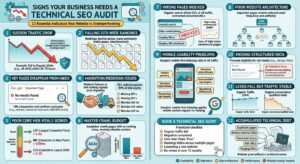
Technical SEO is not the only possible cause. Search demand shifts, new competitors, content quality degradation, and core algorithm updates all affect organic traffic independently. An audit separates technical causes from those wider organic search problems so fixes target the correct root cause.
How to identify whether the traffic drop is technical: Cross-reference the date of the traffic decline against deployment logs, migration dates, and Google Search Console coverage data. A decline that begins within hours of a website change — rather than rolling across weeks — points directly to a technical cause. Google’s documentation on core algorithm updates and search ranking systems explains what changes with each confirmed rollout, giving a reliable baseline for ruling out algorithmic causes.
Fact: Research by Conductor shows that organic search drives 53% of all website traffic, making commercial page visibility a direct revenue lever, not just an SEO metric.
Sign 2: Are Your Google Rankings Falling Across Multiple Pages?
Falling rankings across multiple pages simultaneously indicate a website-wide technical problem, not an isolated content quality issue.
When I see rankings drop across a range of previously stable pages in the same week, my first action is always to check the site’s crawl and index status before touching a single piece of content. Rewriting pages before fixing the underlying technical fault wastes time and budget.
Technical problems weaken Google’s ability to access or interpret pages through these mechanisms:
- Incorrect canonicalisation — ranking signals consolidate to the wrong URL
- Internal linking changes — pages that lost inbound internal links receive fewer crawls and reduced PageRank
- Redirect chains — multi-hop redirects dilute link equity and slow crawl efficiency
- Duplicated URL structures — parameter variations or trailing-slash inconsistencies create competing versions of the same page
Do not assume every ranking decline requires new content. Pages that previously ranked well and declined simultaneously share a structural cause, and that cause lives in the website’s technical configuration. Established crawl barriers prevent ranking signal consolidation, meaning even strong content cannot recover positions until the infrastructure problem is resolved.
Sign 3: Have Important Pages Disappeared From Google’s Index?
Important pages disappearing from Google’s index represent the clearest signal that a technical SEO audit is overdue. A page excluded from the index generates zero organic search traffic, regardless of its content quality or backlink profile.
Google Search Console’s URL Inspection tool confirms whether a specific page is indexed and identifies the reason for exclusion if it is not. The Coverage report categorises excluded pages by error type, giving a structured starting point for diagnosis.
Common Causes of Page De-indexation
Pages vanish from Google’s index when technical directives actively block, exclude, or redirect crawlers away from those URLs:
- Robots.txt rules block crawlers from accessing specific URL paths entirely
- Noindex directives exclude pages from the index while still permitting crawl access — including
noindexmeta tags added during development and not removed before launch - Canonical signals consolidate multiple URLs into a single preferred version; a canonical tag pointing to a different URL signals Google to index the canonical target instead
- Redirect instructions send users and crawlers to a different destination URL
- Incorrect HTTP status codes signal page errors (404, 410) or server failures (500) to Googlebot
- Duplicate or low-value URL variants dilute crawl budget across near-identical page versions
- Orphaned pages — those carrying zero internal links — receive less crawl priority and rank poorly even when technically indexed
We have seen cases where a single misconfigured canonical tag excluded an entire product category from Google’s index for over three months. The pages loaded perfectly for customers. The technical barrier existed only at the crawler level.
Google’s own indexing documentation explains the relationship between crawlability and index inclusion — a page must be crawlable before it can be evaluated for indexing. Google Search Console surfaces indexing data across these categories, but accurately diagnosing why a page is absent requires direct examination of the site’s directives, architecture, and redirect behaviour.
Sign 4: Did a Website Migration or Redesign Cause a Traffic Drop?
Website migrations are the single most frequent cause of sudden, severe organic traffic loss. A migration that moves URLs without complete redirect mapping, alters internal linking architecture, or changes canonical signals destroys years of accumulated ranking authority within days.
Ahrefs’ research on site migrations documents that incomplete redirect coverage is the primary culprit in post-migration traffic loss — not content changes or domain authority shifts. In our experience reviewing post-migration sites, the most common overlooked error is a noindex directive carried from the staging environment — not redirect chains, which developers typically handle, but tag-level directives that no one specifically checks before go-live.
Migration Problems a Technical Audit Identifies
- Missing or broken 301 redirects from old URLs to new equivalents
- Internal links still pointing to the old URL structure post-migration
- Canonical tags referencing the pre-migration domain or URL format
- XML sitemap not updated to reflect the new URL structure
- Hreflang tags broken during international site migrations
- HTTPS certificates misconfigured after HTTP-to-HTTPS migrations
- Structured data stripped during template rebuilds
- Navigation architecture consolidated in ways that sever internal link equity pathways
The audit should validate redirect coverage against a full crawl of the pre-migration URL inventory, not just a sample. A redirect map missing 10% of URLs can account for 40–60% of traffic loss if the uncovered URLs carry high-authority backlinks.
The correct time to run technical SEO checks is before launch, not after traffic falls. If the redesigned site is already live and organic sessions have dropped, a post-migration audit compares old and new URL behaviour, maps redirect accuracy, and identifies which specific pages lost ranking position as a direct result of the project.
Fact: A 301 redirect passes approximately 99% of link equity to the destination URL, according to Google’s documentation on redirect equity consolidation. Chains of three or more redirects reduce crawl efficiency and increase the risk of equity loss.
Sign 5: Are Core Web Vitals Scores Suppressing Organic Performance?
Core Web Vitals scores directly affect a page’s eligibility for the page experience ranking signal, which Google applies across all search results. Pages scoring “Poor” on Largest Contentful Paint (LCP), Interaction to Next Paint (INP), or Cumulative Layout Shift (CLS) face a measurable ranking disadvantage against competitors with “Good” scores.
I have audited sites where LCP scores above 4 seconds were consistently suppressing rankings for high-commercial-intent pages against faster competitors. Fixing server response times and deferring non-critical JavaScript moved those pages from “Poor” to “Good” within two crawl cycles.
Core Web Vitals Benchmarks (2025)
| Metric | Full Name | Good | Needs Improvement | Poor |
|---|---|---|---|---|
| LCP | Largest Contentful Paint | ≤ 2.5s | 2.5s – 4.0s | > 4.0s |
| INP | Interaction to Next Paint | ≤ 200ms | 200ms – 500ms | > 500ms |
| CLS | Cumulative Layout Shift | ≤ 0.1 | 0.1 – 0.25 | > 0.25 |
Source: web.dev / Google Search Central — 2024 updated thresholds
Google assesses these scores at the 75th percentile of page loads from Chrome User Experience Report (CrUX) field data — meaning the real experience of actual visitors, not lab conditions. Core Web Vitals data from real users carries more weight in Google’s ranking algorithm than lab data from tools like Lighthouse.
Root causes of poor Core Web Vitals scores include:
- Oversized images delivered without modern formats (WebP, AVIF) or responsive sizing
- Render-blocking scripts loaded synchronously in the document head
- Third-party code from ad networks, chat widgets, or analytics platforms
- Unoptimised web fonts causing layout shifts or flash-of-unstyled-text (FOUT)
- Slow server response times — Time to First Byte (TTFB) above 800ms
- Client-side rendering behaviour that delays the Largest Contentful Paint element
Speed alone does not determine rankings — Google has stated this publicly. Core Web Vitals function as a tie-breaker between pages of comparable relevance, making performance a technical and user-experience diagnostic worth measuring on every audit.
An SME website failing on INP and LCP simultaneously faces a compounding disadvantage in mobile search results that no amount of new blog content can offset.
Sign 6: Is Your Website Crawl Budget Being Wasted?
Crawl budget — the number of pages Googlebot crawls on a site within a given period — determines how quickly new and updated content enters Google’s index. Sites with thousands of pages, frequent content updates, or complex URL structures face crawl budget constraints that a technical audit must address.
Crawl budget waste occurs when Googlebot crawls pages that carry no ranking value:
- Parameter-generated URLs — e-commerce filters creating thousands of near-duplicate pages
- Faceted navigation — category filters producing URL combinations that multiply exponentially
- Session IDs and tracking parameters appended to URLs without canonicalisation
- Redirect loops — URL A redirecting to URL B, which redirects back to URL A
- Long redirect chains — three or more hops between the original URL and the final destination
- Broken internal links — anchor tags pointing to 404 or 410 responses
- Paginated archives beyond the content’s actual depth
- Staging subdomain content accessible to Googlebot
- Inconsistent URL formats — trailing slash variants, uppercase/lowercase duplicates, www/non-www conflicts
- Inaccessible navigation — JavaScript-rendered menus that Googlebot cannot reliably parse
Fact: Google’s John Mueller confirmed in a 2023 Search Central session that crawl budget is most relevant for large sites with tens of thousands of URLs — but misconfigured robots.txt rules and redirect chains affect crawl efficiency on sites of any size.
How to Assess Crawl Budget Health
- Review Googlebot crawl activity in the Search Console Crawl Stats report
- Cross-reference crawled URLs against the XML sitemap to identify gaps
- Audit robots.txt to confirm low-value URLs are blocked from crawl
- Implement canonical tags on parameter-driven URL variants
For SMEs with sites under 1,000 pages, crawl budget is rarely the primary concern. For e-commerce sites with large product catalogues or filter-generated URLs, crawl budget management directly affects how quickly products and category pages appear in search results. Crawl efficiency — the ratio of valuable pages Googlebot discovers versus low-value URLs it processes — shapes how well a site performs in organic search overall.
Sign 7: Does Google Index the Wrong Pages on Your Website?
Google indexing unwanted URLs signals weak technical controls that dilute crawl budget and fragment search engine signals away from revenue-generating pages.
URLs that commonly trigger indexation problems include:
- Internal search results — expose infinite URL variants with no ranking value
- Filter combinations — multiply product or service pages without adding unique content
- URL parameters — create duplicate access paths to identical content
- Duplicate category pages — split link signals across redundant taxonomic entries
- Staging environment URLs — expose development content to live indexation
- Tag archives and pagination variants — inflate page counts without proportional content depth
Duplicate content compounds this problem when multiple URLs serve the same or substantially similar information, splitting ranking signals and creating ambiguity for crawlers. E-commerce and service websites expose this most frequently through URL parameter variations, session IDs, and HTTP/HTTPS or www/non-www inconsistencies.
Canonical tags resolve the ambiguity by identifying the preferred URL, but canonicalisation only works when all signals agree. Conflicting signals — where internal links point to one version, the sitemap references another, and the canonical tag specifies a third — actively undermine ranking consolidation.
A unified signal set requires alignment across:
| Signal Type | Function | Common Conflict |
|---|---|---|
| Canonical tag | Declares preferred URL to crawlers | Points to non-canonical version |
| Internal links | Pass equity to linked URL | Link to redirected or duplicate URLs |
| XML sitemap | Prioritises URLs for crawl | Includes paginated or filtered variants |
| 301 redirects | Consolidates link equity at destination | Chain redirects dilute equity transfer |
A technical SEO audit identifies every conflicting signal and recommends whether the correct fix is canonicalisation, a redirect, content consolidation, or architectural separation.
Sign 8: Does Poor Website Architecture Bury Your Most Important Pages?
Website architecture directly determines how efficiently crawlers and users reach high-value pages. Pages sitting three or more clicks from the homepage receive fewer internal links and accumulate less page-level authority — regardless of content quality.
A clear hierarchy transfers authority down predictable pathways:
Homepage → Services → SEO Services → Technical SEO Audit
A disconnected page structure forces crawlers to find pages through XML sitemaps alone, bypassing the contextual equity that internal links provide. I have reviewed sites where a core service page received fewer than three internal links across an entire 200-page website — that page simply could not compete against structurally well-connected competitors.
Orphaned pages — those with zero internal links pointing to them — can disappear from crawl cycles entirely. Service pages disconnected from logical navigation hierarchies rank below competitors with cleaner internal linking structures, even when the content itself is stronger.
A technical SEO audit maps every internal link relationship, calculates link depth per page, and flags pages that receive insufficient contextual connections relative to their commercial value. Ahrefs’ research on technical SEO issues found that 84.2% of websites analysed contained at least one technical SEO issue affecting crawl efficiency — and internal linking failures represent a disproportionate share of those findings.
Sign 9: Are Mobile Visitors Experiencing Problems That Cost Rankings?
Google applies mobile-first indexing to determine rankings, meaning the mobile version of a page’s content defines how Google understands and evaluates that page — not the desktop version. Google’s own documentation on mobile-first indexing confirms that hidden content, missing structured data, or slower mobile performance directly affects how that page competes in search results.
Technical mobile problems that audit processes frequently surface include:
- Hidden primary content — content loaded only on desktop or blocked behind mobile-specific scripts
- Intrusive interstitials — overlays that obscure content and trigger Google’s intrusive interstitial penalty
- Inaccessible tap targets — links and buttons too small or too close for reliable mobile interaction
- Rendering differences — JavaScript-dependent content that renders differently on mobile user agents
- Missing structured data — schema markup present on desktop templates but absent from mobile equivalents
- Slow mobile Core Web Vitals — LCP, INP, and CLS metrics that underperform relative to desktop scores
Testing one page on one device does not validate mobile performance across an entire site. A technical SEO audit tests templates and page types systematically, using mobile emulation and field data to distinguish isolated issues from template-level failures.
Sign 10: Is Structured Data Missing or Generating Validation Errors?
Structured data (schema markup) communicates entity relationships, content type, and specific attributes directly to search engines in a machine-readable format. Broken or absent structured data prevents a page from qualifying for rich results in Google Search — including product ratings, FAQ entries, review stars, and event listings.
We routinely audit sites where Product schema is implemented but missing required properties like price, availability, or brand, causing the rich result to fail Google’s eligibility check without generating a visible error on the page itself. I have also audited sites where a developer removed schema.org structured data markup from service pages during a plugin update, which reduced rich result appearances in SERPs and cut click-through rates on high-intent queries.
Google’s Rich Results Test tool validates structured data against Google’s eligibility requirements and identifies missing required properties. Template-generated markup requires testing across multiple page types — a single template error replicates across hundreds or thousands of pages simultaneously.
Structured Data a Technical Audit Validates
- Product schema — price, availability, brand, and review properties
- LocalBusiness schema — name, address, telephone, opening hours
- Article schema — author, datePublished, dateModified
- BreadcrumbList schema — correct URL hierarchy for navigational rich results
- FAQPage schema — correctly paired question-and-answer markup
- Service schema — service type matched to page function
Structured data provides crawlers with explicit semantic signals — the search engine decides independently whether to display enhanced features, but invalid or absent markup removes eligibility entirely.
Sign 11: Are Organic Leads Falling Even When Traffic Looks Stable?
Stable organic traffic masks declining commercial SEO performance when informational pages retain their visibility while high-intent service pages quietly lose rankings.
This is one of the most misread signals I see in SME reporting. The session count looks fine in GA4, so the business assumes SEO is working. But the leads have dried up.
To get an accurate picture, compare these six metrics:
| Metric | Why It Matters |
|---|---|
| Organic conversions | Measures revenue-generating actions, not just visits |
| Commercial landing-page clicks | Isolates performance on pages designed to generate enquiries |
| Impressions for high-intent queries | Reveals whether service-term visibility is eroding in Search Console |
| Rankings for service and product terms | Confirms or rules out position losses on commercial pages |
| Conversion rate by landing page | Identifies pages losing qualified users despite retaining traffic |
| Qualified leads from organic search | The business outcome metric that traffic totals cannot replace |
Technical changes to high-value pages — a template rebuild, a canonical tag error, a noindex flag left on after staging — produce disproportionate commercial damage without triggering a dramatic sitewide traffic drop. For an SME, qualified leads and revenue-attributed sessions give more actionable data than raw traffic totals.
Sign 12: Has Your Website Grown Without a Technical SEO Review?
Websites that expand without structured SEO oversight accumulate technical debt — a compounding build-up of architectural problems, conflicting signals, and indexation waste that degrades ranking performance gradually rather than catastrophically.
A website that began as five pages and grew to 50 through organic content additions, plugin installations, and developer template changes frequently carries problems its owners have never identified. Each addition layer introduces risk: blog plugins generate tag archives; CMS updates alter URL structures; developers add landing pages without canonical tags; staging environments go live without noindex controls.
Typical symptoms of accumulated technical debt include:
- Duplicate pages competing for the same queries
- Redirect chains that have grown from 2 hops to 4+ hops as new redirects were added on top of old ones
- Canonical tags correctly implemented but now pointing to URLs that have since been changed
- Sitemap files referencing 301-redirected or 404 URLs
- Inconsistent internal links that fragment crawl equity
- Pages added by a developer or CMS plugin that are indexed but should not be
Signs that technical debt has reached an actionable threshold include:
- Page count has doubled without a corresponding architecture review
- Multiple developers or agencies have touched the site over its lifetime
- CMS or platform migrations occurred without a post-migration audit
- Rankings plateaued despite consistent content production
- Crawl reports show URLs that no one intentionally created
We consistently find that sites older than three years without an audit carry at minimum two or three structural problems significant enough to suppress competitive rankings on target queries.
How Redirecting 404 Errors to the Homepage Causes Ranking Losses

Redirecting all 404 responses to the homepage is a crawl signal failure, not a solution. Google classifies homepage redirects from irrelevant URLs as soft 404 errors — the server returns a 200 status code, but the content delivered does not match the requested URL. Google’s guidelines on soft 404 errors confirm that soft 404s waste crawl budget and can suppress the indexed version of the destination page.
I have seen sites where a single category page deletion cascades into 80+ broken internal links — every product card that previously linked to that category now directs Googlebot to a 404. That kind of structural breakage rarely appears in surface-level analytics but consistently correlates with ranking suppression across the affected category’s supporting pages.
Each broken URL requires a specific response based on its history and value:
| Scenario | Correct Response |
|---|---|
| Page moved permanently to a new URL | 301 redirect to the new, relevant URL |
| Page deleted with no relevant replacement | 410 Gone status to confirm intentional removal |
| Internal link points to an obsolete URL | Update the internal link directly at source |
| Staging URL exposed to live index | Restrict access and submit removal via Search Console |
| Redirect chain created by multiple hops | Flatten to a single direct redirect |
A technical SEO audit distinguishes between harmless 404 responses — deleted pages with no inbound links or traffic — and errors that interrupt important crawl pathways or waste recovered link equity.
When Should a Business Commission a Technical SEO Audit?
A technical SEO audit is most justified under specific, diagnosable conditions — not on a fixed calendar schedule alone. Audit frequency should match website complexity, development velocity, and commercial dependence on organic search.
A static five-page SME brochure site carries a different risk profile than a 2,000-product e-commerce platform updated daily. Treating both with the same annual audit cadence underserves the high-complexity site and over-engineers the simple one.
A technical review is warranted after:
- Organic traffic declined more than 20% month-on-month without a clear content or demand explanation
- A website migration, redesign, or CMS change was completed within the past 90 days
- Important commercial pages are absent from Google’s index
- Core Web Vitals reports show “Poor” scores for key landing pages
- Rankings fell across multiple pages simultaneously
- Launching a new website or rebuilding an existing one
- Migrating domains or CMS platforms (WordPress to Webflow, Magento to Shopify, etc.)
- Changing large volumes of URLs via restructuring or taxonomy changes
- Adding significant new functionality — filters, search, dynamic pages, JavaScript-rendered content
- The site has not received a structured technical review in over 12 months
In practice, I recommend that any SME with active development work treats a technical SEO review as part of the project sign-off process — not an afterthought triggered by ranking losses.
Technical SEO Audit Checklist: When to Book One
Use this checklist to assess whether your site warrants a structured technical review. Book an audit if you answer yes to one or more:
| Warning Sign | What It Indicates | Diagnostic Tool |
|---|---|---|
| Organic traffic fell without explanation | Algorithm update, crawl block, or penalty | Google Search Console |
| Rankings dropped across multiple pages | Site-wide technical fault or index quality issue | Ahrefs / Semrush |
| Important URLs vanished from Google | Indexation block, noindex tag, or deindex event | Google Search Console Coverage |
| Performance fell after a redesign or migration | Redirect failure, canonical error, or lost link equity | Screaming Frog / Log Files |
| Google indexes unwanted or duplicate URLs | Thin content, parameter issues, or missing canonicals | Search Console + Sitemap audit |
| Persistent crawl or redirect problems | Broken redirect chains or crawl budget waste | Screaming Frog |
| Key pages lack internal links | Orphaned pages invisible to Googlebot | Site crawl / internal link report |
| Poor mobile performance | Core Web Vitals failure or non-responsive design | Google PageSpeed Insights |
| Organic enquiries have dropped | Traffic quality loss or landing page degradation | Google Analytics 4 |
| No technical review for 12+ months | Accumulated technical debt from updates and changes | Full audit required |
The audit output must prioritise findings by commercial impact — not severity score alone. A broken image on a blog post ranks far lower in priority than a canonical tag mispointing on a primary service page that generates £50,000 in annual enquiry value. Technical SEO audit methodology from Semrush covers crawl budget, site architecture, and canonical signal validation — giving a reliable external benchmark for what a structured audit process should address.
Frequently Asked Questions
How do I know if my site’s traffic drop is a technical SEO problem or a Google algorithm update?
Cross-reference the exact date your organic traffic declined against your deployment logs, CMS update history, and Google’s confirmed algorithm update schedule from the Google Search Central blog. A traffic loss that begins within 24–72 hours of a site change — a migration, template update, or robots.txt edit — almost always traces to a technical cause, not an algorithm shift. Algorithm-driven losses typically roll out over days to weeks and affect entire industry verticals simultaneously, not just your site. Google Search Console’s Coverage report and crawl stats reveal technical barriers; Google’s update history rules out algorithmic causes.
What is the fastest free way to find technical SEO errors on my website right now?
Open Google Search Console and check the Coverage report for indexing errors, the Core Web Vitals report for performance failures, and the URL Inspection tool on your top commercial pages. Run Screaming Frog’s SEO Spider free tier (up to 500 URLs) to extract broken links, redirect chains, missing meta tags, and duplicate content across your site. Use Google’s Rich Results Test on pages where you expect structured data eligibility. These three tools together surface the majority of high-impact technical issues at zero cost — though interpreting why issues affect commercial performance requires pattern recognition across all data sources simultaneously.
Why are my service pages losing rankings even though I keep publishing new blog content?
New blog content cannot recover service page rankings when those pages carry unresolved technical barriers. If a service page has an incorrect canonical tag, insufficient internal links, a noindex directive left from staging, or poor Core Web Vitals scores, Google either cannot access it correctly or deprioritises it against technically healthier competitors. A 2023 study by Ahrefs found that 66.5% of pages have zero backlinks, meaning technical indexation errors disproportionately harm smaller sites that cannot rely on link authority to compensate for crawl and indexation problems. Diagnose the service pages directly before investing further in supporting content.
How does a technical SEO audit differ from what my web developer already checks?
Web developers verify that a site loads correctly in a browser, passes accessibility checks, and functions as intended for human visitors. A technical SEO audit verifies that the site functions correctly for Googlebot — a fundamentally different evaluation. A site can load perfectly in Chrome while simultaneously serving noindex tags on key pages, generating thousands of duplicate URLs through faceted navigation, or blocking Googlebot via robots.txt. Screaming Frog’s SEO Spider crawls a site the way Googlebot does, surfacing errors completely invisible to browser testing. Developers and SEO auditors check different failure modes against different standards.
What happens to my SEO if I switch CMS platforms without running a technical audit first?
A CMS migration without a pre-launch technical audit frequently destroys years of accumulated ranking authority. URL structures change without redirect mapping, internal link paths break, canonical tags reference the old domain format, sitemaps remain unpopulated, and noindex directives from the development environment carry into the live site. Ahrefs’ research on site migrations identifies incomplete redirect coverage as the primary driver of post-migration traffic loss. A pre-migration audit documents the full URL inventory, identifies which pages carry the most ranking authority, maps the required redirect architecture, and specifies the structured data, canonical, and sitemap configurations the new CMS must replicate — before a single page goes live.